Setup guide
From zero to streaming.
Follow the steps in order. Most people are done in about 20 minutes. You only edit a config file once; everything after that happens in the web panel.
Before you start
You need:
- A Telegram account, and a channel (or several) with your movies and series.
- A free MongoDB Atlas account.
- Somewhere to run it: a VPS with Docker (recommended), or a free host such as Koyeb, Render or orkestr.
- A domain name is recommended for HTTPS, so Stremio can reach you from any network.
Just for yourself, with no server? The TeleStremio app runs the same idea on your phone or computer.
1. Get your Telegram values
- API ID and API hash. Open my.telegram.org, sign in, choose API development tools and create an app. Copy
api_idandapi_hash. - Bot token. Message @BotFather, send
/newbotand follow the prompts. Copy the token it sends. - Your user ID. Message @userinfobot. It replies with your numeric ID. This is the owner of the server.
- Make the bot an admin in every channel that holds your media. Without admin rights it cannot read or stream the files.
2. Create the databases
The server needs two MongoDB links: one for tracking (settings, tokens, users) and one for storage (your library). One free cluster can hold both.
- Create a free cluster on MongoDB Atlas.
- Under Database Access, add a user with a password.
- Under Network Access, allow
0.0.0.0/0so your server can connect. - Click Connect → Drivers and copy the connection string. Put your password in it.
- Make two links from it by adding a database name to each, and join them with a comma:
mongodb+srv://user:pass@cluster0.xxxx.mongodb.net/tracking,mongodb+srv://user:pass@cluster0.xxxx.mongodb.net/storage1
Running out of space later? Add more storage databases from Settings → Extra Storage Databases without touching the config.
3. Deploy
Every option uses the same six values:
| Variable | What it is |
|---|---|
API_ID | From my.telegram.org |
API_HASH | From my.telegram.org |
BOT_TOKEN | From @BotFather |
OWNER_ID | Your numeric Telegram user ID |
DATABASE | Two MongoDB links, comma-separated (tracking first) |
PORT | 8000 |
VPS with Docker (recommended)
Any Ubuntu VPS with a public IP works. Install Docker first if it is not there (curl -fsSL https://get.docker.com | sh).
git clone https://github.com/weebzone/Telegram-Stremio
cd Telegram-Stremio
cp sample_config.env config.env
nano config.env
Fill in the six values, save with Ctrl + O, Enter, then Ctrl + X.
API_ID="1234567"
API_HASH="abc123def456ghi789jkl012mno345pq"
BOT_TOKEN="1234567890:AAEabcdEFGhijkLMnOPqrsTUVwxyz12345"
OWNER_ID="987654321"
DATABASE="mongodb+srv://user:pass@cluster0.xxxx.mongodb.net/tracking,mongodb+srv://user:pass@cluster0.xxxx.mongodb.net/storage1"
PORT="8000"
docker compose up -d
The config file is mounted into the container, so after editing it you only need docker compose restart.
docker build -t telegram-stremio .
docker run -d --name telegram-stremio --restart unless-stopped -p 8000:8000 telegram-stremio
The panel is now at http://<your-vps-ip>:8000. Add a domain in step 4 for HTTPS.
Heroku
Use the ready-made Colab notebook. It asks for the six values and deploys the container for you.

When it finishes, open https://<app>.herokuapp.com/login and set Settings → Base URL to that address.
Koyeb (free)

- Press the button and sign in to Koyeb.
- Fill in the empty variables. Leave
PORTas8000. - Press Deploy. When it is running, copy the public URL (
https://….koyeb.app). - Open
<url>/loginand set Settings → Base URL to that URL.
Render (free)

- Press the button and sign in to Render.
- Fill in the variables it asks for, then press Apply.
- Copy the service URL (
https://….onrender.com), open<url>/loginand set Settings → Base URL.
Render's free plan sleeps after 15 minutes without visitors. The first request after that takes about a minute.
orkestr (free)
- Fork the repository on GitHub.
- Sign up at console.orkestr.eu and create a project from your fork, branch
master. It uses the includedDockerfile. - Add the six variables in the project's environment settings.
- Deploy, copy the public URL, open
<url>/loginand set Settings → Base URL.
Free hosts are slow at streaming video. For smooth playback, add Cloudflare streaming so the video goes through Cloudflare and the host only serves catalogs.
4. Domain and HTTPS (VPS)
Stremio on phones and TVs needs HTTPS. Point a domain at your VPS and let Caddy handle the certificate.
- At your domain registrar, add an A record: name
@(or a subdomain), value your VPS IP. - Install Caddy:
sudo apt install -y debian-keyring debian-archive-keyring apt-transport-https curl
curl -1sLf 'https://dl.cloudsmith.io/public/caddy/stable/gpg.key' | sudo gpg --dearmor -o /usr/share/keyrings/caddy-stable-archive-keyring.gpg
curl -1sLf 'https://dl.cloudsmith.io/public/caddy/stable/debian.deb.txt' | sudo tee /etc/apt/sources.list.d/caddy-stable.list
sudo apt update && sudo apt install caddy
Then replace /etc/caddy/Caddyfile with:
your-domain.com {
    reverse_proxy localhost:8000
}sudo systemctl reload caddy
Your panel is now at https://your-domain.com.
5. First login
- Open
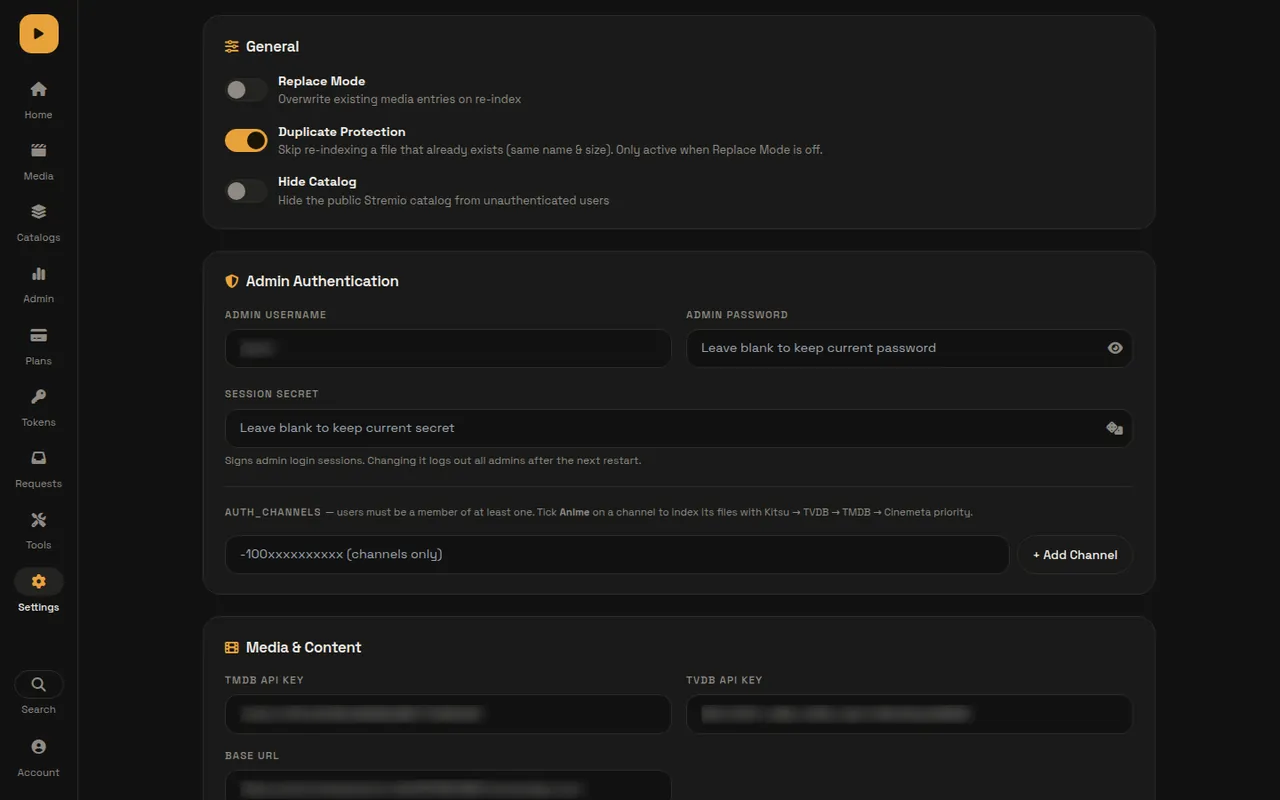
/loginand sign in withadmin/admin. - The home page shows a Finish setting up checklist. Open Settings.
- Admin Authentication: change the username and password first.
- Media & Content: set Base URL to your public address (for example
https://your-domain.com). Stremio uses it to reach your streams, so it must be right. - Add a free TMDB API key (themoviedb.org → Settings → API). A TVDB key improves series matching.
- Set Upstream Repo to
https://github.com/weebzone/Telegram-Stremioand branchmaster, so Restart also updates. - Press Save Settings (or Ctrl + S). Most changes apply right away.
6. Channels
In Settings → Admin Authentication → AUTH_CHANNELS, add each media channel by @username or its -100… ID. Tick Anime on anime channels. The bot must be an admin in each one.
Keeping content in separate channels makes the library easier to manage. A layout many people use:
| Channel | What goes in it | Set as |
|---|---|---|
| Movies | Single movies | AUTH |
| TV Shows | Series episodes | AUTH |
| Anime | Anime episodes and movies | AUTH, tick Anime |
| Split | Big files split into .001, .002 parts | AUTH |
| Manual | Personal videos added by hand | Manual channel |
| Announcements | Automatic "new title" posts | Announcement channel |
| Skip | Files that failed to match, with a note | Skip channel |
Already have files in a channel? Open Tools → Channel Scanner, select the channels and press Start Scan to index everything that is already there.
7. Add files
Forward or post a video to an AUTH channel. The server reads the file name (or caption) and fetches the details. Better names give better matches.
Movies: title, year, quality
Oppenheimer.2023.1080p.BluRay.x264.mkv
3 Idiots (2009) 2160p 4K HEVC.mkv
Series: title, SxxEyy, quality
Loki.S02E03.720p.HEVC.mkv
Panchayat S03E05 Hindi 1080p.mkv
Split files and season packs
Avatar.2009.2160p.BluRay.mkv.001   ← parts play as one file
One Piece S01 E01-E13 1080p.mkv    ← Season 1, episodes 1–13
Friends S03 1080p.mkv              ← whole Season 3
Split zip archives (.zip.001, .zip.002) stream too, as long as they are stored without compression.
Personal videos and odd names
For a family video, lecture series, or anime with no season number, set a Manual channel in Settings, then use Media → Add title for one file or Tools → Manual Upload Session to attach many files to one title. Search accepts a title, an IMDb link or a TMDB link.
Subtitles
Subtitle files named like the video (for example Loki.S02E03.en.srt) are attached automatically. You can also add one from the title's Subtitles tab.
8. Watch in Stremio and Nuvio
- Send
/startto your bot. It replies with your personal install link:https://your-domain.com/stremio/<token>/manifest.json - Stremio: open Add-ons, paste the link in the search box and install.
- Nuvio: Addons → Add addon → paste the link → Install. Then Settings → Collections → Import from URL with
…/stremio/<token>/nuvio-collection.jsonfor Netflix, Prime Video, Bollywood, Anime and more rows. - Each link has a Configure page (
/stremio/<token>/configure) where the person can sort qualities, hide some, and reorder or hide catalogs.
Install the addon before importing Nuvio collections, or Nuvio shows empty rows.
9. Users, tokens and plans
Free or private server
Keep Subscription off. Open Tokens → New token, name it (for example "Living Room TV"), optionally set daily or monthly GB limits, and copy the install link to share. Each row has buttons to change limits, set or extend expiry, link a Telegram user, or delete the key.
Selling access
- Turn Subscription on in Settings. Fill in the group ID, payment instructions, an optional QR image and the approver IDs.
- Open Plans → Add plan and set days and price, for example 30 days for ₹99.
- Users press
/startin your bot, pick a plan and send a payment screenshot. An approver taps Approve and the bot sends the user their link and a group invite.
You and your approvers always keep access. A key stops working when its plan or expiry ends, or pauses when it hits a data limit; Stremio shows a clear notice instead of the videos.
10. Catalogs
- Auto catalogs fill themselves by language (Bollywood, Anime, K-Drama…), OTT service (Netflix, Prime Video, JioHotstar…) and smart lists such as Latest Releases. Toggle them on Catalogs and press Sync.
- Custom catalogs are your own lists. Choose who sees each one: everyone, chosen tokens, or only you. Exclusive titles can be hidden from search.
- Set the order Stremio shows rows in from Catalogs → Order.
11. Cloudflare streaming (optional)
Video traffic is what makes a server expensive. With a Cloudflare streaming Worker the video bytes go through Cloudflare while your server keeps catalogs, tokens and limits, so a small free host is enough.
- Get it at proxy.weebzonex.workers.dev. You receive a Worker URL and a secret on Telegram.
- Open Settings → Cloudflare Streaming, paste the Worker URL and the shared secret.
- Set Stremio Links to Both while testing, then Cloudflare only. Save.
12. Update, restart and logs
- Logs: Settings → System & Maintenance shows live logs, with a download button.
- Update: press Restart Now. It pulls the latest code from the upstream repo and the page reloads by itself when the server is back.
- Docker: you can also run
git pull && docker compose up -d --build. - Backups: Settings → Backup & Restore exports settings, catalogs, plans and tokens. Library for TeleStremio exports your library for the TeleStremio app.
- Scale: add more storage databases and more bot tokens from Settings. Add extra bots as admins in every AUTH channel first.
13. Web panel tips
- Three themes: Paper, Ink and Night. Switch from the account menu, or press Shift + T.
- Ctrl + K (⌘ + K on Mac) opens a command palette to jump to any page or open any title.
- / focuses search, G then a letter changes page, ? lists every shortcut.
- On phones the panel has a bottom dock; Plans, Tokens, Requests, Tools and Settings are under More.
- Share
/requestwith your viewers so they can ask for titles. You answer them under Requests.
Troubleshooting
Files are not indexed
Check that the bot is an admin in the channel, the channel is in AUTH_CHANNELS, and the name has a title, a year or SxxEyy, and a quality. Look in the Skip channel for a note on what failed, or fix the match from the title's Rescan tab.
Streams do not start in Stremio
Make sure Base URL is your public HTTPS address and opens from outside your network. The Admin page's Health & Diagnostics card checks it for you.
"Join Required", "Plan Expired" or "Limit Reached"
The person must join your subscription group (wait two minutes), renew in the bot, or wait for their data limit to reset. You can extend them from Tokens or Plans.
Forgot the admin password
- Open telegram-stremio-reset.vercel.app and paste your tracking database link (the first one in DATABASE).
- Press Reset. Restart the app fully (for example
docker restart tg_stremio). - Sign in with your username and the password
admin, then set a new one in Settings.
Still stuck?
Open an issue on GitHub with the relevant lines from the logs. Remove tokens and database links before you paste them.